
How to Log In to Your Threads Account and Make It Yours
October 19, 2026
BuyThreads Help· Customer support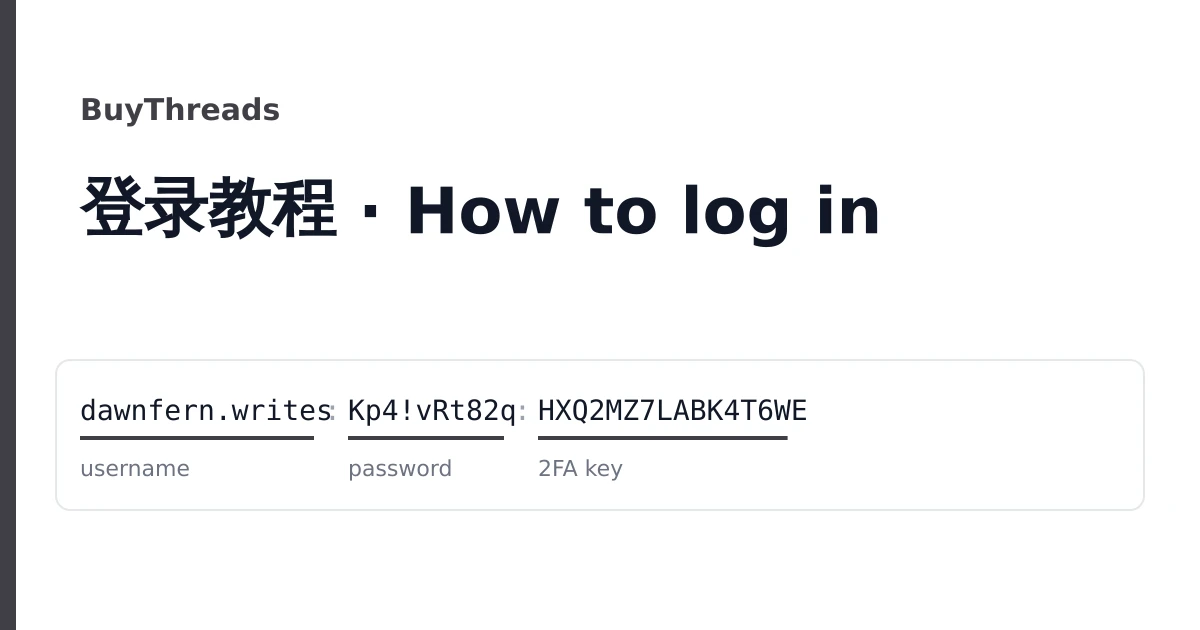
A Threads account bought here arrives as one line on your order page. Open the order from your dashboard to see the lines, one per account, ready to copy or download as a text file. Keep the file private; a line is all anyone needs to get in.
Threads has no separate password of its own for these accounts. The line holds the login of the Instagram account behind the Threads profile, and you use it to open Threads.
What the line contains
The common line has three fields (values made up):
dawnfern.writes;Kp4!vRt82q;HXQ2 MZ7L ABK4 T6WEListings that include the mailbox add two more at the end:
dawnfern.writes;Kp4!vRt82q;HXQ2MZ7LABK4T6WE;dawnfern@example.com;Mb9$wq31| Field | What it is | Notes |
|---|---|---|
| Username | The Instagram username, also the Threads handle | No @ in the line. Type it as shown. |
| Password | The Instagram password | Case-sensitive. Copy it, do not retype it. |
| 2FA key | The secret behind the account's two-factor codes | Letters and digits, sometimes in groups of four. Spaces in it do not matter. |
| Email and email password | The mailbox the account was registered with | Only on listings that say email access. |
Some batches use colons, vertical bars or three dashes instead of semicolons. The order of the fields stays the same.
Route 1: the Threads app
- Install Threads and open it. If the phone already has an Instagram account signed in, Threads will offer that one; choose to switch or log in with another account.
- Choose "Log in with Instagram" and enter the username and password from the line.
- When the app asks for a security code, go to the code step below.
Route 2: the browser
- Open threads.net and choose Log in.
- Pick "Continue with Instagram" and enter the username and password.
- When asked for a code, go to the code step below.
The code step
Paste the 2FA key into https://checkkit.net/en/online-2fa-code-generator. It shows a six-digit code that changes every 30 seconds. Type the current code into the app or the browser. If it is refused, wait for the next code and try again; check that the phone or computer clock is set automatically, since a wrong clock produces wrong codes.
Instagram may then show a screen about a login from a new device and ask whether it was you. Confirm that it was.
Reading the included mailbox
If your listing came with the email and its password, sign in to that mailbox through the webmail the listing names. You will find Instagram's messages there, including any confirmation codes it sends by email. If your listing has no mailbox, the account still works with the username, password and key; you can add your own email later.
Make it yours
Do this before you post or order anything for the profile. Threads account settings are managed in Instagram's Accounts Center.
- Change the password to a new one that only you know. This signs out other sessions.
- Open two-factor authentication, turn the authentication app method off and on again, and scan the new key with your own authenticator. The delivered key then stops working. Save the backup codes Instagram shows.
- Set the email to an address you control. If the listing gave you the mailbox, also change that mailbox's own password.
- Check the profile picture, name and bio, and change them to suit what you will post.
Instagram's terms, which cover Threads, do not allow accounts to be sold or transferred, and Instagram can ask any account to confirm itself again. Use the account within the rules of both apps.
Before you grow it
Followers and likes from this site need a public profile or post link and nothing else, never this account's password. Post a few threads and set the profile to public first; a growth order on an empty or private profile has nothing to land on.
If the login fails
"Incorrect password"
Copy the password field again on its own and paste it. Two tries, then stop: repeated failures can block logins for a while.
The code is refused every time
Set the device clock to automatic and use a fresh code. If it still fails, note the time and screenshot the error.
Locked, suspended, or asked for a check the line cannot pass
Screenshot the screen before you tap anything else.
Reporting it
Open a ticket from your order page within the warranty window on the listing, with the username, what you tried and the screenshot. Logging in does not void the warranty; suspensions after bulk or automated activity are not covered. For the differences between listings, see the catalogue and the home page.